Building TestExchange: From a Single-Server CEX to a Decoupled Matching Engine
TestExchange is a learning-focused mini Centralized Exchange (CEX) built from scratch to understand how trading systems, order books, matching engines, balances, persistence, and event-driven architectures work together.
Building TestExchange: From a Single-Server CEX to a Decoupled Matching Engine
TestExchange is a learning-focused mini Centralized Exchange (CEX) built from scratch to understand how trading systems, order books, matching engines, balances, persistence, and event-driven architectures work together.

🚀 Project Overview
I built TestExchange as a hands-on project to understand the internal architecture of a centralized exchange rather than simply consuming an exchange API.
The project started as a simple Version 0 monolithic application where everything ran inside a single server:
- Authentication
- User management
- Wallet/balances
- Order creation
- Order matching
- Order book
- Trade execution
- PostgreSQL persistence
The next step was to evolve the system into a more realistic Version 1 architecture, where the matching engine becomes an independent service and communication happens through Redis queues.
The overall evolution is:
V0

Client
  │
  ▼
Backend
  │
  ├── Authentication
  ├── Order API
  ├── Matching Engine
  ├── OrderBook (RAM)
  ├── Balances (RAM)
  └── PostgreSQL
to:
V1

Client
  │
  ▼
Backend Service
  │
  ▼
Redis Queue
  │
  ▼
Matching Engine
  │
  ├── OrderBook (RAM)
  ├── Balances (RAM)
  └── Engine State
          │
          ▼
      PostgreSQL
The goal wasn't to build a production exchange. The goal was to understand the engineering problems that appear when building one.
🧠 What Is a Centralized Exchange?
A centralized exchange, or CEX, is a platform where users submit orders to a central system that maintains the market and matches buyers with sellers.
For example:
Hardik wants to buy:

2 SOL @ $10
Another user might submit:
Raghav wants to sell:

2 SOL @ $10
The exchange's matching engine finds the compatible orders and creates a trade.
Conceptually:
Buyer
  │
  │ BUY 2 SOL @ $10
  ▼
┌──────────────────────┐
│    Matching Engine   │
│                      │
│  BUY 2 @ 10          │
│        ↕             │
│  SELL 2 @ 10         │
└──────────────────────┘
  │
  ▼
Trade executed
The exchange is responsible for maintaining:
- Users
- Balances
- Orders
- Order books
- Trades/fills
- Market state
- Authentication
- Order matching
🏦 Broker vs Exchange
One important distinction I learned while building this project is that a broker and an exchange are not the same thing.
A broker primarily provides access to markets and routes or executes customer orders.
An exchange maintains the market itself.
A simplified exchange looks like:
BUYERS
  │
  ▼
┌────────────────────┐
│    ORDER BOOK      │
│                    │
│ BIDS     ASKS      │
│ $10      $11       │
│ $9       $12       │
│ $8       $13       │
└────────────────────┘
  ▲
  │
SELLERS
The matching engine is responsible for determining which orders can trade.
📖 Core Trading Concepts
Order Book
For every market, the exchange maintains two sides:
Bids
Orders from users willing to buy.
BIDS

Price     Quantity

$12       2 SOL
$11       5 SOL
$10       3 SOL
Bids are sorted from highest price to lowest price.
The highest bid is the best bid.
Asks
Orders from users willing to sell.
ASKS

Price     Quantity

$13       2 SOL
$12       4 SOL
$11       3 SOL
Asks are sorted from lowest price to highest price.
The lowest ask is the best ask.
Therefore:
              ORDER BOOK

SELL SIDE
──────────────
$13     2 SOL
$12     4 SOL
$11     3 SOL   ← Best Ask
──────────────
          $10.50
──────────────
$10     5 SOL   ← Best Bid
$9      3 SOL
$8      2 SOL
──────────────
BUY SIDE
The difference between the best ask and best bid is the spread.
📌 Limit Orders
A limit order specifies a price.
For example:
{
  "type": "limit",
  "side": "buy",
  "market": "SOL",
  "price": 10,
  "quantity": 5
}
This means:
Buy up to 5 SOL, but don't pay more than $10 per SOL.
If the order cannot be completely filled, the remaining quantity can stay in the order book.
For example:
BUY 5 SOL @ $10

Existing asks:

2 SOL @ $9
The order executes:
2 SOL @ $9
Remaining:
3 SOL @ $10
The remaining 3 SOL becomes a resting bid.
📌 Market Orders
A market order does not specify a price.
For example:
{
  "type": "market",
  "side": "buy",
  "market": "SOL",
  "quantity": 5
}
The instruction is essentially:
Buy 5 SOL using the best available sellers.
The matching engine walks through the asks from cheapest to most expensive.
ASKS

2 SOL @ $10
1 SOL @ $11
3 SOL @ $12
For:
BUY MARKET 5 SOL
The engine executes:
2 @ $10
1 @ $11
2 @ $12
Total:
5 SOL
Market orders can also be partially filled.
If only:
2 SOL @ $10
exists, then:
Requested: 5 SOL
Filled:    2 SOL
Remaining: 3 SOL
The remaining market order is not placed into the order book.
🧩 Partial Fills
Partial fills are an important part of the matching engine.
Suppose:
BUY 10 SOL @ $10
and the order book contains:
SELL 3 SOL @ $9
SELL 2 SOL @ $10
The engine executes:
3 SOL @ $9
2 SOL @ $10
Result:
Filled:    5 SOL
Remaining: 5 SOL
Because this is a limit order, the remaining 5 SOL can rest in the order book:
BIDS

5 SOL @ $10
🏗️ Version 0 Architecture
The first version intentionally kept the architecture simple.
flowchart TD
    Client[Frontend] --> API[Express API]

    API --> Auth[JWT Authentication]
    API --> OrderAPI[Order API]
    API --> Profile[Profile API]

    OrderAPI --> Engine[Matching Engine]

    Engine --> OrderBook[In-Memory OrderBook]
    Engine --> Balances[In-Memory Balances]

    API --> DB[(PostgreSQL)]
    Engine --> DB

    DB --> Users[Users]
    DB --> Orders[Orders]
    DB --> Fills[Fills]
Everything runs inside one server.
This made Version 0 much easier to develop and debug.
🛠️ Technology Stack
Backend
- Bun
- TypeScript
- Express
Database
- PostgreSQL
- Prisma
Authentication
- JWT
- HTTP-only cookies
Matching Engine
- TypeScript
- In-memory order book
- In-memory balance manager
Frontend
- React
- Trading UI
- Order book
- Market data
- Profile/wallet pages
🔐 Authentication
Users authenticate using JWT-based authentication stored in HTTP-only cookies.
The general flow is:
Login
  │
  ▼
Validate credentials
  │
  ▼
Generate JWT
  │
  ▼
HTTP-only Cookie
  │
  ▼
Authenticated requests
Protected routes extract the user ID from the authentication context before performing operations.
This prevents users from simply sending another user's ID when placing orders or accessing private account information.
💰 Balances
In V0, balances are maintained in memory.
For example:
const BALANCES = {
  1: {
    USD: {
      available: 100,
      locked: 20
    },
    SOL: {
      available: 100,
      locked: 20
    }
  }
};
The distinction between available and locked is important.
Suppose a user has:
USD Available = $100
USD Locked    = $0
They place:
BUY 5 SOL @ $10
The exchange reserves:
$50
so the balance becomes:
USD Available = $50
USD Locked    = $50
The user cannot spend the locked $50 on another order.
📚 Database Models
The core database entities in V0 are:
User
  │
  ├── Orders
  │
  └── Fills

Stock

Order
  │
  └── Fills

Fill
Simplified Prisma models:
model User {
    id       Int      @id @default(autoincrement())
    username String   @unique
    password String

    orders   Order[]
    fills    Fill[]
}

model Stock {
    id     Int    @id @default(autoincrement())
    name   String @unique
    symbol String @unique
}

model Order {
    id               Int      @id @default(autoincrement())
    userId           Int
    market           String
    price            Int
    quantity         Int
    type             Type
    side             Side

    filledQuantity   Int
    remainingQuantity Int
    status           Status

    createdAt        DateTime @default(now())

    user User   @relation(fields: [userId], references: [id])
    fills Fill[]
}

model Fill {
    id               Int      @id @default(autoincrement())
    quantity         Int
    side             Side
    type             Type
    userId            Int
    price             Int
    market            String
    originalOrderID  Int

    createdAt        DateTime @default(now())

    user     User  @relation(fields: [userId], references: [id])
    original Order @relation(fields: [originalOrderID], references: [id])
}
📦 The In-Memory Order Book
The V0 engine maintains something similar to:
const ORDERBOOK = {
  SOL: {
    bids: [],
    asks: [],
    lastTradePrice: 0
  },

  ETH: {
    bids: [],
    asks: [],
    lastTradePrice: 0
  }
};
The important rule is:
BIDS → highest price first

ASKS → lowest price first
This allows the matching engine to simply inspect:
const bestAsk = book.asks[0];
or:
const bestBid = book.bids[0];
🚀 Creating an Order
The order lifecycle in V0 is:
flowchart TD
    Request[POST /order] --> Auth[Authenticate User]
    Auth --> Validate[Validate Request]
    Validate --> Lock[Lock Funds]
    Lock --> DBOrder[Create Order in PostgreSQL]
    DBOrder --> Match{Buy or Sell?}

    Match -->|BUY| Buy[matchBuy]
    Match -->|SELL| Sell[matchSell]

    Buy --> Trade[Execute Trades]
    Sell --> Trade

    Trade --> Memory[Update In-Memory State]
    Memory --> Persistence[Persist Fills and Order Updates]
    Persistence --> Response[Return Final Order]
🧮 processOrder()
The high-level implementation looks like:
export async function processOrder(order: UserOrder) {
    validateOrder(order);

    lockFunds(order);

    const dbOrder = await prismaClient.order.create({
        data: {
            ...order,
            status: "open",
            filledQuantity: 0,
            remainingQuantity: order.quantity
        }
    });

    const result =
        order.side === "buy"
            ? matchBuy(dbOrder)
            : matchSell(dbOrder);

    await persistMatchingResult(result);

    return dbOrder;
}
The important architectural decision here is that the matching engine doesn't need to perform the database writes itself.
⚙️ Matching a BUY Order
For a buy order, we walk through the asks from cheapest to most expensive.
while (
    order.remainingQuantity > 0 &&
    asks.length > 0
) {
    const currentBestAsk = asks[0];

    if (
        order.type === "limit" &&
        currentBestAsk.price > order.price
    ) {
        break;
    }

    const trade = executeTrade(
        order,
        currentBestAsk
    );

    fills.push(...trade.fills);

    if (
        currentBestAsk.remainingQuantity === 0
    ) {
        asks.shift();
    }
}
The important part is:
BUY LIMIT
    ↓
Cheapest Ask
    ↓
Next Cheapest Ask
    ↓
Next Cheapest Ask
A market buy follows the same process but doesn't have a maximum price.
⚙️ Matching a SELL Order
For a sell order, we walk through the bids from highest to lowest.
while (
    order.remainingQuantity > 0 &&
    bids.length > 0
) {
    const currentBestBid = bids[0];

    if (
        order.type === "limit" &&
        currentBestBid.price < order.price
    ) {
        break;
    }

    const trade = executeTrade(
        currentBestBid,
        order
    );

    fills.push(...trade.fills);

    if (
        currentBestBid.remainingQuantity === 0
    ) {
        bids.shift();
    }
}
So:
SELL LIMIT
    ↓
Highest Bid
    ↓
Next Highest Bid
    ↓
Next Highest Bid
🔥 Executing a Trade
The most important function in the engine is executeTrade().
It doesn't talk to Prisma.
It changes the in-memory trading state and produces data that can later be persisted.
export function executeTrade(
    buyOrder: Order,
    sellOrder: Order
) {
    const tradeQty = Math.min(
        buyOrder.remainingQuantity,
        sellOrder.remainingQuantity
    );

    const tradePrice = sellOrder.price;

    buyOrder.remainingQuantity -= tradeQty;
    buyOrder.filledQuantity += tradeQty;

    sellOrder.remainingQuantity -= tradeQty;
    sellOrder.filledQuantity += tradeQty;

    buyOrder.status =
        buyOrder.remainingQuantity === 0
            ? "closed"
            : "partial_filled";

    sellOrder.status =
        sellOrder.remainingQuantity === 0
            ? "closed"
            : "partial_filled";

    return {
        fills: [
            {
                side: "buy",
                type: buyOrder.type,
                quantity: tradeQty,
                price: tradePrice,
                market: buyOrder.market,
                userId: buyOrder.userId,
                originalOrderID: buyOrder.id
            },
            {
                side: "sell",
                type: sellOrder.type,
                quantity: tradeQty,
                price: tradePrice,
                market: sellOrder.market,
                userId: sellOrder.userId,
                originalOrderID: sellOrder.id
            }
        ],

        updatedOrders: [
            {
                id: buyOrder.id,
                filledQuantity: buyOrder.filledQuantity,
                remainingQuantity: buyOrder.remainingQuantity,
                status: buyOrder.status
            },
            {
                id: sellOrder.id,
                filledQuantity: sellOrder.filledQuantity,
                remainingQuantity: sellOrder.remainingQuantity,
                status: sellOrder.status
            }
        ],

        tradePrice
    };
}
This separation was one of the important improvements made during V0 development.
🧠 Separation of Responsibilities
Instead of allowing executeTrade() to perform everything, responsibilities are separated.
executeTrade()
│
├── Update order quantities
├── Update balances
├── Update last trade price
└── Return persistence data
While:
matchBuy()
│
├── Walk asks
├── Decide whether matching can continue
├── Remove completely filled asks
└── Place remaining limit order into bids
And:
matchSell()
│
├── Walk bids
├── Decide whether matching can continue
├── Remove completely filled bids
└── Place remaining limit order into asks
This makes the engine easier to reason about and test.
🧾 Fills vs Orders
One trade produces two fills.
For example:
BUY Order #101
SELL Order #205
Trade:
2 SOL @ $10
Creates:
Fill #1

userId = buyer
side = BUY
quantity = 2
price = 10
originalOrderID = 101
and:
Fill #2

userId = seller
side = SELL
quantity = 2
price = 10
originalOrderID = 205
This makes it possible to build:
- Trade history
- User fill history
- Order history
- Market trade history
💾 Database Persistence
The matching engine produces:
{
    fills,
    updatedOrders,
    lastTradePrice
}
The persistence layer then writes those changes to PostgreSQL.
For related changes, PostgreSQL transactions provide all-or-nothing behavior: either the grouped changes commit, or they are rolled back.
For example:
await prismaClient.$transaction(async (tx) => {

    await tx.fill.createMany({
        data: fills
    });

    for (const order of updatedOrders) {
        await tx.order.update({
            where: {
                id: order.id
            },
            data: {
                filledQuantity:
                    order.filledQuantity,

                remainingQuantity:
                    order.remainingQuantity,

                status:
                    order.status
            }
        });
    }
});
This is especially important because a trade usually changes multiple pieces of state:
Buyer
 ├── USD
 └── SOL

Seller
 ├── USD
 └── SOL

Buyer Order
Seller Order

Buyer Fill
Seller Fill
Those database changes should not be treated as unrelated operations.
🛑 Cancelling Orders
Canceling an order also requires careful balance handling.
For a partially filled BUY:
BUY 10 SOL @ $10

Filled:    3 SOL
Remaining: 7 SOL
Initially:
Locked = $100
After the 3 SOL trade:
Locked = $70
When canceling:
Unlock $70
not the $30 that was already spent.
For a SELL:
SELL 10 SOL

Filled:    3
Remaining: 7
The remaining 7 SOL should be unlocked.
The order should then transition to something like:
OPEN
   ↓
PARTIALLY_FILLED
   ↓
CANCELLED
rather than using a single ambiguous closed state for both filled and cancelled orders.
📊 TestExchange UI
The frontend was designed with a retro, hand-drawn visual style rather than copying the traditional polished-finance aesthetic.

The trading page contains:
┌──────────────────────────────────────────────────────────┐
│ TestExchange                         spot   stocks        │
├──────────────────────────────────────────────────────────┤
│                                                          │
│  Chart                  Order Book             Order     │
│  ┌──────────────┐       ASKS                  ┌───────┐ │
│  │              │       $90                    │ Buy   │ │
│  │ Price Chart  │       $89                    │ Sell  │ │
│  │              │       ───                   │       │ │
│  │              │       $88                    │ Limit │ │
│  └──────────────┘       BIDS                  │Market │ │
│                           $87                  └───────┘ │
│                           $86                            │
│                                                          │
├──────────────────────────────────────────────────────────┤
│ Balances | Open Orders | Order History | Fill History    │
└──────────────────────────────────────────────────────────┘
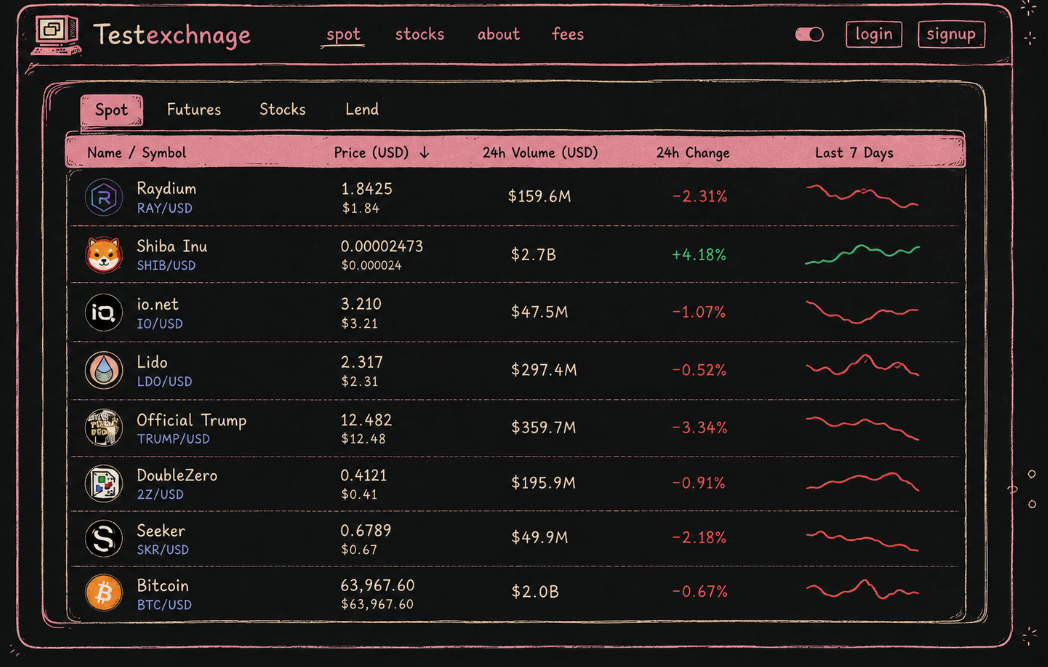
📈 Spot Market Page
The spot page provides an overview of available markets.

Markets display information such as:
- Name
- Symbol
- Current price
- 24h volume
- Market cap
- 24h change
- Recent price movement
Clicking a market takes the user to:
/spot/trade/:market
For example:
/spot/trade/BTC
👤 Profile Page
The profile page provides:
- User information
- Balances
- Deposits
- Orders
- Fills
- Trading history

💥 The Problem With V0
V0 worked, but it exposed a major architectural problem.
The order book and balances lived only in RAM.
For example:
const ORDERBOOK = {
    SOL: {
        bids: [],
        asks: [],
        lastTradePrice: 0
    }
};

const BALANCES = {
    1: {
        USD: {
            available: 100,
            locked: 20
        }
    }
};
If the Node/Bun process crashes:
SERVER CRASH
     │
     ▼
RAM LOST
     │
     ├── ORDERBOOK ❌
     └── BALANCES  ❌
PostgreSQL still contains users, orders, and fills, but the engine's current in-memory state disappears.
This led to the next architectural question:
How can the matching engine remain extremely fast while surviving server restarts?
💾 V0.1: Snapshot Persistence
One possible improvement is periodically writing the in-memory state to a snapshot.
RAM
 │
 │ every 2 minutes
 ▼
snapshot.json
Example:
{
  "timestamp": "2026-08-17T10:00:00Z",
  "orderbook": {
    "SOL": {
      "bids": [],
      "asks": [],
      "lastTradePrice": 150
    }
  },
  "balances": {
    "1": {
      "USD": {
        "available": 80,
        "locked": 20
      }
    }
  }
}
On restart:
snapshot.json
       │
       ▼
ORDERBOOK + BALANCES
This is simple, but it introduces a recovery window.
If the last snapshot was two minutes ago:
10:00 → Snapshot
10:01 → Trade
10:02 → Trade
10:03 → Crash
The 10:01 and 10:02 state changes could be lost.
🚀 Version 1: Decoupling the Matching Engine
The biggest architectural change planned for V1 is separating the matching engine from the API/backend server.
Instead of:
Frontend
   │
   ▼
Backend + Engine
we move toward:
flowchart LR
    Client[Frontend] --> Backend[Backend Service]

    Backend --> RequestQueue[(Redis Request Queue)]

    RequestQueue --> Engine[Matching Engine]

    Engine --> Memory[In-Memory State]

    Memory --> OrderBook[OrderBook]
    Memory --> Balances[Balances]

    Engine --> ResponseQueue[(Redis Response Queue)]

    ResponseQueue --> Backend

    Engine --> DB[(PostgreSQL)]
Now the backend and matching engine have separate responsibilities.
🧩 Backend Service
The backend becomes responsible for:
Authentication
User APIs
Profile
Market APIs
Order requests
WebSocket connections
Database access
It does not directly perform the matching logic.
⚙️ Matching Engine Service
The engine becomes responsible for:
Order validation
OrderBook
Balances
Matching
Trade execution
Market state
Order state transitions
Its most important data structures remain in memory because order matching needs extremely fast access.
📬 Redis as the Communication Layer
The backend can send an order to the engine through Redis.
Conceptually:
Backend

{
    correlationId: "abc-123",
    type: "CREATE_ORDER",
    userId: 10,
    market: "SOL",
    side: "buy",
    type: "limit",
    price: 100,
    quantity: 5
}

        │
        ▼

Redis Queue

        │
        ▼

Matching Engine
The engine processes the request and publishes a response:
{
    correlationId: "abc-123",
    status: "success",
    orderId: 101,
    filledQuantity: 5,
    remainingQuantity: 0
}
The correlationId allows the backend to associate the asynchronous engine response with the original request.
🔄 V0 vs V1
| Area | V0 | V1 |
|---|---|---|
| Backend | Single service | Separate service |
| Matching Engine | Same process | Separate process |
| OrderBook | RAM | Engine RAM |
| Balances | RAM | Engine RAM |
| PostgreSQL | Directly accessible | Persistence layer |
| Communication | Function calls | Redis |
| Order processing | Synchronous | Asynchronous |
| Scaling | Limited | Easier to scale |
| Engine restart | Rebuild manually | Snapshot/recovery |
| Failure isolation | Low | Higher |
🧠 Why Keep OrderBook in Memory?
The matching engine constantly needs:
Best Bid
Best Ask
Next Bid
Next Ask
For example:
const bestAsk = orderBook.asks[0];
The matching engine should not need to perform:
SELECT *
FROM orders
WHERE ...
ORDER BY price ASC
LIMIT 1;
for every matching operation.
The order book is a highly active data structure.
The database is better suited for durable storage and historical queries.
This leads to an important principle:
Memory is optimized for speed. Database storage is optimized for durability and querying.
🧱 V1 Recovery Strategy
A separate matching engine introduces another problem:
What happens if the engine crashes?
The engine could use a combination of:
Snapshot
+
Event/Operation Log
The conceptual recovery process becomes:
flowchart TD
    Crash[Engine Crash] --> Snapshot[Load Latest Snapshot]
    Snapshot --> Replay[Replay Events After Snapshot]
    Replay --> State[Rebuild In-Memory State]
    State --> Ready[Start Consuming Redis Orders]
For example:
10:00
Snapshot created

10:01
Order placed

10:02
Trade executed

10:03
Order cancelled

10:04
Engine crashes
Recovery:
Load 10:00 snapshot

↓

Replay 10:01 order

↓

Replay 10:02 trade

↓

Replay 10:03 cancellation

↓

Current state restored
This approach reduces the amount of state that needs to be rebuilt from scratch.
🏗️ Target Architecture
The longer-term architecture looks like:
flowchart TB

    User[User / Browser]

    Frontend[Frontend Service]

    Backend[Backend API]

    RedisIn[(Redis Request Queue)]

    Engine[Matching Engine]

    EngineMemory[Engine Memory]

    OrderBook[OrderBook]
    Balances[Balances]

    RedisOut[(Redis Response Queue)]

    DB[(PostgreSQL)]

    Snapshot[(Snapshot / Recovery)]

    User --> Frontend
    Frontend --> Backend

    Backend --> RedisIn

    RedisIn --> Engine

    Engine --> EngineMemory

    EngineMemory --> OrderBook
    EngineMemory --> Balances

    Engine --> RedisOut
    RedisOut --> Backend
    Backend --> Frontend

    Engine --> DB
    Engine --> Snapshot
🔁 Complete Order Journey in V1
A BUY order would travel through the system like this:
User
 │
 │ POST /order
 ▼
Backend
 │
 │ authenticate
 │ validate request
 │ create correlationId
 ▼
Redis Request Queue
 │
 ▼
Matching Engine
 │
 ├── validate engine state
 │
 ├── lock funds
 │
 ├── inspect order book
 │
 ├── match order
 │
 ├── update balances
 │
 ├── update order book
 │
 ├── generate fills
 │
 └── persist result
 │
 ▼
Redis Response Queue
 │
 ▼
Backend
 │
 ▼
User
🔐 Why Correlation IDs Matter
Once communication becomes asynchronous, the backend cannot simply do:
const result = matchBuy(order);
Instead:
Backend
   │
   ├── Request A → Engine
   ├── Request B → Engine
   └── Request C → Engine

Engine
   │
   ├── Response B
   ├── Response A
   └── Response C
Responses may not necessarily arrive in the same order.
Therefore:
correlationId
becomes important.
Example:
{
  "correlationId": "order-request-123",
  "type": "CREATE_ORDER",
  "payload": {
    "userId": 10,
    "market": "SOL",
    "side": "buy",
    "quantity": 2
  }
}
The response contains the same identifier.
📡 WebSockets
The trading UI also benefits from WebSockets.
Instead of repeatedly polling:
GET /orderbook
GET /trades
GET /price
GET /orders
the server can push updates.
For example:
Matching Engine
       │
       ▼
Trade Event
       │
       ▼
WebSocket Server
       │
       ▼
Browser
The browser can immediately update:
- Order book
- Last trade price
- Recent trades
- User order status
- Balance changes
📊 Example Trade Event
A trade event could look like:
{
  "type": "TRADE_EXECUTED",
  "market": "SOL",
  "price": 100,
  "quantity": 2,
  "timestamp": 1720000000
}
The frontend can use this event to update the trading interface without requesting the entire market state again.
⚠️ Concurrency Is the Next Challenge
A single-process V0 engine is relatively easy to reason about because JavaScript executes engine operations sequentially within the process.
Once the engine is distributed, concurrency becomes much more important.
Imagine:
User A → BUY 10 SOL
User B → SELL 5 SOL
User C → BUY 5 SOL
The engine needs a deterministic ordering.
For a single market, the matching engine should process commands in a well-defined sequence:
Order 101
   ↓
Order 102
   ↓
Order 103
rather than allowing multiple workers to mutate the same order book concurrently.
This is one reason a dedicated matching engine is useful.
💳 Money and Precision
One lesson from building the exchange was that financial values should not be treated casually.
Instead of relying on JavaScript floating-point values such as:
10.25
a real implementation should consider integer units or a decimal representation.
For example:
$10.25

↓

1025 cents
or for crypto:
1.234567 SOL

↓

1234567 base units
The important idea is to avoid unexpected floating-point rounding during financial calculations.
🧪 Testing the Matching Engine
The matching engine can be tested independently from HTTP.
For example:
describe("matching engine", () => {

    it("should fully fill a buy order", () => {
        // setup order book

        // place buy order

        // assert fills

        // assert remaining quantity
    });

});
Important cases include:
✓ Full fill
✓ Partial fill
✓ No fill
✓ Limit buy
✓ Limit sell
✓ Market buy
✓ Market sell
✓ Multiple fills
✓ Exact price match
✓ Price improvement
✓ Order cancellation
✓ Insufficient balance
✓ Empty order book
✓ Market order with insufficient liquidity
🧠 Lessons From V0
Building V0 first was intentional.
It allowed me to understand the actual business logic before introducing distributed systems.
The most important concepts I learned were:
1. The order book is a data structure
It's not just a database table.
It needs:
Price ordering
Fast best-price access
Quantity updates
Order removal
2. Matching is deterministic
A matching engine needs clear rules:
Best price first
Then time priority
3. Balances need available and locked states
Without locked balances, users could potentially reuse funds committed to open orders.
4. Orders and fills are different concepts
An order represents the user's instruction.
A fill represents an actual execution.
One order can generate multiple fills.
5. Market orders don't rest
If a market order cannot find enough liquidity, the unfilled remainder doesn't become a resting order.
6. Limit orders can rest
A partially filled limit order can remain in the book.
🧩 Why I Didn't Start With Redis
It would have been tempting to immediately build:
Redis
Kafka
WebSockets
Multiple Services
PostgreSQL
But that would make it difficult to understand whether problems came from:
Matching logic
OR
Distributed communication
OR
Persistence
OR
Concurrency
Starting with V0 made the core trading engine understandable first.
Then the architecture can evolve around a working domain model.
🚧 What V1 Is Trying to Solve
V1 isn't about changing the matching rules.
The core logic remains:
Order
 ↓
Validate
 ↓
Lock
 ↓
Match
 ↓
Trade
 ↓
Settlement
The difference is where the components live.
V0:
Everything in one process
V1:
Backend
   │
Redis
   │
Matching Engine
   │
PostgreSQL
This separation improves:
- Failure isolation
- Independent scaling
- Engine performance
- Maintainability
- Clear service boundaries
🗺️ Roadmap
V0 — Completed
- JWT authentication
- HTTP-only authentication cookies
- User registration/login
- USD deposits
- User balances
- Spot markets
- Order book
- Limit orders
- Market orders
- Partial fills
- Full fills
- Order cancellation
- Trade/fill history
- Order history
- Profile page
- Trading page
- In-memory matching engine
- PostgreSQL persistence
V0.1 — Reliability Improvements
- Periodic snapshots
- Engine state recovery
- Better error handling
- Matching engine unit tests
- Better persistence boundaries
V1 — Decoupled Architecture
- Separate matching engine service
- Redis request queue
- Redis response queue
- Correlation IDs
- WebSocket market updates
- Engine snapshots
- Event replay
- Engine recovery
- Better concurrency control
Future
- Multiple markets
- Improved market data service
- More advanced order types
- Rate limiting
- Observability
- Metrics
- Distributed deployment
- Load testing
- Fault injection testing
🎯 Final Thoughts
The most valuable part of building TestExchange wasn't the UI or even the API.
It was understanding what actually happens after a user clicks Buy.
A simple:
BUY 2 SOL @ $100
eventually becomes:
Authentication
       ↓
Validation
       ↓
Balance reservation
       ↓
Order creation
       ↓
Order book lookup
       ↓
Price matching
       ↓
Trade execution
       ↓
Balance settlement
       ↓
Fill creation
       ↓
Order state update
       ↓
Market update
       ↓
Response to user
And when the system evolves from a single process to a distributed architecture, the same business operation becomes:
Client
  ↓
Backend
  ↓
Redis
  ↓
Matching Engine
  ↓
In-Memory State
  ↓
Persistence
  ↓
Redis
  ↓
Backend
  ↓
Client
That transition from a simple monolith to a decoupled event-driven system is the main reason I built this project.
TestExchange is not intended to be a production financial exchange. It is a practical engineering project for understanding how exchanges, matching engines, state management, persistence, and distributed systems fit together.
📸 Project Screenshots
Landing Page

Spot Markets

Trading Page

Profile

Architecture

🎥 Demo
<!-- Paste your GitHub user-attachments video URL here -->https://github.com/user-attachments/assets/YOUR-VIDEO-ID
🛠️ Tech Stack
Frontend
  ├── React
  └── WebSocket

Backend
  ├── Bun
  ├── TypeScript
  └── Express

Trading Engine
  ├── TypeScript
  ├── In-Memory OrderBook
  └── In-Memory Balances

Communication
  └── Redis

Persistence
  ├── PostgreSQL
  └── Prisma

Authentication
  └── JWT + HTTP-only Cookies
📚 What I Learned
Building a CEX is less about creating a
BUYbutton and more about building a system where state, ordering, money, execution, and persistence remain consistent while the system is changing constantly.
That is the problem I wanted TestExchange to help me understand.